

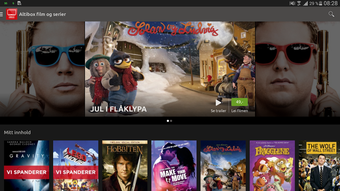
Description
Download TV Overalt APK – TV Streaming, Remote Control, On-Demand Content
Overview
TV Overalt APK is a free multimedia application developed by Altibox AS for Android devices. Designed for modern TV enthusiasts, the app serves as a centralized platform for live television streaming, on-demand content access, and remote control functionality for compatible TV decoders. It operates within the Video subcategory and aims to simplify how users interact with their television experience across multiple devices.
The app enables users to stream over 40 live TV channels directly from their Android smartphones or tablets. With a simple tap on a channel logo, viewers can instantly switch to their preferred broadcast. The interface supports intuitive navigation through swiping gestures, allowing seamless channel transitions. Additionally, the ability to rewind live content by up to three hours enhances the viewing experience, particularly for users who miss the start of a program.
For those managing their viewing schedules, the built-in TV guide allows users to browse current and upcoming programming. By swiping vertically, users can explore what’s airing across different channels, while horizontal swiping provides access to future broadcast schedules. The app also supports remote control of TV decoders, enabling users to schedule recordings directly from their mobile device. This feature is especially beneficial for users who want to record shows without using a physical remote.
Another notable capability is the option to download purchased content for offline viewing. This allows users to watch their favorite programs on the go, making the app ideal for commuters or travelers. While the developer did not provide additional system requirements, the app is available for free on Android devices and is compatible with most smartphones and tablets.
Key Features & Capabilities
- Live TV Streaming – Access over 40 live television channels directly through the app, offering a wide variety of programming including news, sports, entertainment, and documentaries.
- Channel Navigation – Switch between channels by tapping on channel logos or using swipe gestures for a smooth and responsive browsing experience.
- Live Rewind Functionality – Rewind live broadcasts by up to three hours by dragging the time indicator backward, allowing users to catch up on missed content.
- Remote Decoder Control – Use the app to remotely control a compatible TV decoder, enabling users to open the TV guide, select programs, and initiate recordings.
- TV Guide & Scheduling – View current and future programming across multiple channels. Swipe up/down to explore channel-specific content and left/right to browse upcoming shows.
- Offline Content Access – Download purchased or recorded content for offline playback, ideal for watching shows while traveling or in areas with limited connectivity.
These features collectively enhance the user’s control over their television experience. For instance, a user can check the TV guide on their tablet while at work, schedule a recording for a favorite show, and later download it to watch during a commute. The remote decoder functionality is particularly useful in households with multiple devices, allowing family members to manage recordings without physical access to the decoder.
The integration of live streaming, recording, and offline viewing into a single application streamlines media consumption. The app’s design supports both passive viewing and active content management, making it suitable for both casual users and power users who want greater control over their TV experience.
User Interface, Workflow & Performance
The user interface of TV Overalt APK is designed with simplicity and efficiency in mind. The layout centers around a channel grid or list view, where users can quickly identify and select their desired broadcast. Channel logos are clearly displayed, and navigation is intuitive, relying on touch-based interactions such as tapping and swiping.
Workflow efficiency is enhanced through gesture-based controls. Swiping left or right allows users to cycle through channels in real time, while vertical swiping enables exploration of the TV guide across different channels. The rewind feature is implemented through a draggable timeline, providing a tactile way to navigate live content.
Performance observations are based on general software behavior patterns. The app is designed to run smoothly on Android devices, though exact performance details were not specified. Resource usage, including CPU and RAM consumption, remains unspecified. The developer did not provide additional information about stability or background operation.
Given that the app is free and available on a wide range of Android devices, it is likely optimized for varied hardware configurations. However, actual performance may vary depending on device capabilities and network conditions. Users are advised to ensure a stable internet connection for uninterrupted live streaming and recording operations.
Compatibility & System Requirements
TV Overalt APK is designed for Android devices and is available for free download on smartphones and tablets. The app supports a broad range of Android versions, though specific version numbers were not listed by the developer. Installation size is not publicly disclosed, but it is expected to be within typical ranges for multimedia applications.
Exact system requirements were not listed. Compatibility information is limited to the Android platform. The app does not appear to require a specific device model or hardware configuration, suggesting broad accessibility across different Android devices.
Users should ensure their device meets the minimum Android OS requirements for app installation. For optimal performance, a stable internet connection is recommended, especially when streaming live content or downloading recorded programs.
Pros and Cons
Pros
- Free to download and use with no subscription fees
- Access to over 40 live TV channels from a single interface
- Intuitive swipe-based navigation for channels and TV guide
- Live content rewind up to 3 hours for catching up on missed programming
- Remote control of TV decoders for recording and scheduling
- Offline viewing of downloaded purchased content
- Comprehensive TV guide with future programming previews
Cons
- Compatibility with specific TV decoder models not clearly defined
- Exact system requirements and file size not disclosed
- Performance metrics and resource usage details unavailable
- Limited to Android devices; no support for iOS or desktop platforms
- Offline content may require additional purchase or subscription
FAQ Section
Is TV Overalt APK compatible with all Android devices?
The app is designed for Android smartphones and tablets, but the developer did not specify exact compatibility requirements. Users should ensure their device runs a supported Android version.
Can I use TV Overalt to record shows on my TV decoder?
Yes, the app allows users to remotely control a compatible TV decoder. You can open the TV guide, select a program, choose the decoder, and initiate a recording.
Is the app secure to download and use?
TV Overalt APK is developed by Altibox AS, a known provider in the Norwegian media market. As a free app available through official channels, it is considered secure when downloaded from trusted sources.
Does the app require an internet connection?
Yes, a stable internet connection is required for live streaming, remote decoder control, and downloading content. Offline viewing is only possible for previously downloaded material.
Can I watch recorded shows on my mobile device?
Yes, downloaded purchased content can be watched offline on Android devices. This feature is ideal for viewing programs while traveling or in areas with limited connectivity.
Final Thoughts + CTA
TV Overalt APK delivers a powerful, feature-rich experience for Android users seeking to enhance their television viewing. With live streaming, remote decoder control, and offline playback, the app bridges the gap between traditional TV and modern mobile consumption. Its intuitive interface and robust functionality make it a standout choice for users who value flexibility and control.
While some technical details such as system requirements and performance metrics are not publicly available, the app’s core features are well-executed and accessible. It is particularly beneficial for Altibox customers and anyone looking for a free, comprehensive TV management tool on Android.
Download TV Overalt APK now and take full control of your TV experience—stream live channels, record your favorite shows, and watch on the go.
Guides & Tutorials for TV Overalt APK
How to install TV Overalt APK
- Click the Preview / Download button above.
- Once redirected, accept the terms and click Install.
- Wait for the TV Overalt APK download to finish on your device.
How to use TV Overalt APK
This software is primarily used for its core features described above. Open the app after installation to explore its capabilities.
User Reviews for TV Overalt APK 0
No reviews found





